Getting Started With Claude
I've learned Claude the way I've always learned technology — clicking on everything, experimenting, working through discovery. This is the first in a series that walks you through getting set up properly, from choosing the right model and plan to the features most people miss in their first ten minutes.
Working with Claude (2026)Part 1 of 7
This article is part of a series. Use the links below to navigate between them.
Towards the back end of last year, I hit a wall with ChatGPT. The performance felt like it was degrading. Conversations would go in circles. I'd ask for something specific and get back something that felt like it had been run through a politeness filter three times. I'd dabbled with Gemini and thought it was impressive, but it didn't handle persistent context well — it wasn't learning about me or my work the way ChatGPT had been.
I'd heard a lot about Claude. So I decided to give it a go.
Since then, I've only become more committed. Claude runs my consulting practice now — content, client work, strategy, code, knowledge management. It's the first thing I open when I sit down to work. And I'm not alone in that experience. In nearly every organisation I've spoken to recently, someone on the team has tried Claude, shown the rest of the team, and the reaction has been the same: this is what AI is meant to feel like. That "holy shit" moment that we'd all been expecting from AI for a long time.
So I'm writing this series to help you get set up. Properly.
I should say upfront: I have not read a single article or explainer on how to use Claude since I first signed up. I've learned the way I've always learned technology — clicking on everything, experimenting, working through discovery. What that means for you is that everything in this series is grounded in my own experience. I'm not regurgitating Anthropic's documentation or parroting what's doing the rounds on YouTube and Instagram. For my audience, I wanted something that talks through this tool in a way that comes from actually using it, every day, for real work.
The Models
Before we talk about pricing, you need to understand what you're actually choosing between. Claude has three models, and each one is built for different kinds of work.
- Sonnet is the workhorse. It's fast, it's capable, and it handles the vast majority of tasks well — drafting, analysis, coding, research, conversation. If you're not sure which model to use, use Sonnet. Most people will use Sonnet most of the time, and that's not a compromise — it's a genuinely strong model.
- Opus is the most capable model. Stronger reasoning, better at holding complex context across long conversations, more nuanced writing. It's slower than Sonnet and it burns through your usage quota faster, but when you need genuine depth — complex analysis, long-form writing where tone and voice matter, multi-step reasoning, or anything where Sonnet's output isn't quite landing — Opus is where you go. I use Opus for just about everything now, but that's because I'm on a plan that gives me the usage to do it. Most people won't be, and I'll get to that.
- Haiku is the lightest model. Fast, cheap, designed for scanning and summarising rather than deep thinking. Here's how I think about it: if you've got a 50-page PDF and you need to pull out the key data before you do the real work, Haiku is the right tool for that job. Use Opus or Sonnet for the actual thinking. Use Haiku to process materials, create summaries, and extract the information you'll need. In Claude Code — the terminal-based coding tool — Haiku is what gets deployed as an agent to scan through a codebase and read everything before the more capable model starts making decisions. That's a good mental model for how to use it generally: Haiku reads, Opus and Sonnet think.
Pick Your Plan
The number one thing that's going to feel confusing when you start using Claude is that there are limits. Depending on which plan you choose, you're not getting fully unbridled access to the tool. Every other AI product has conditioned you to expect unlimited usage for a flat monthly fee. Claude doesn't work like that.
And I think that's both a good and a bad thing.
The big shift is that you have to treat AI usage as a finite resource. And having that constraint has taught me more about how to actually use AI than two and a half years of working with ChatGPT ever did. You'll see plenty of people complaining on Reddit about usage limits and how much bang they're getting for their buck. I get that — to an extent. But where I've landed is this:
We've been coddled for years into thinking we should get access to anything for $20 to $30 / month. Claude is as good as hiring a part-time employee in terms of how much extra output it creates. So when you start thinking about paying $100 or $200 a month for it, my framing to you is: what is this potentially unlocking?
That's a harder pill to swallow if you're employed and paying for it yourself — you're essentially subsidising your own productivity without an immediate income upside. But for leaders, entrepreneurs, and solo consultants like me, the maths is different.
I'm currently on the Max 20x plan. That's $340 AUD a month (US$200). What I'm saving on contractor fees for technical work alone recoups that cost easily. But more than that — it's unlocking my ability to take on more complex projects that I wouldn't have had the confidence to tackle previously. The tool isn't just saving me money. It's expanding what I can do.
Here's how the plans actually feel in practice.
Free
I'm not going to spend much time here. If you're serious about trying Claude, sign up for Pro straight away. On the free plan, you'll hit a paywall within about 30 minutes of real use. You get Sonnet but not Opus, your conversations may be used for training, and the usage limits are tight enough that you'll barely get into a flow before you're locked out. It's fine for a test drive. It's not fine for work.
Pro — $30 AUD/month (US$20)
Pro is for people who are still finding their feet. You're not going to get more than about two hours of solid usage before you hit your limit. And I wouldn't even bother using Opus on Pro — it chews through your quota so fast that you'll barely get a conversation going. Stick to Sonnet at this tier.
I was on Pro for probably two or three weeks when I first started. I was using Claude for some strategic thinking, a couple of technical tasks, but nothing intensive. Even then, I'd regularly hit my usage limit within two or three hours. Pro is the right plan if you want a better day-to-day AI than whatever you're currently using and you don't need it for more than an hour or two at a stretch.
The moment I started integrating Claude into my daily workflow — using it as a genuine work partner rather than an occasional tool — I moved to Max.
Max 5x — $170 AUD/month (US$100)
This is where Claude stops being something you check in with and starts being something you work alongside. Five times the usage of Pro, which in practice means you can sustain a proper working session without constantly watching the meter.
The 5x plan is for anyone who's starting to use Claude as a genuine thought partner. Anyone who's using it for document generation, spreadsheet creation, data analysis — the kind of work that requires iteration and burns through credits fast. If Claude is becoming a core part of your workflow rather than an occasional companion, this is the tier.
At Max 5x, you'd also start using Opus the majority of the time, though you still want to be somewhat conscious of your usage — you don't have unlimited limits.
Max 20x — $340 AUD/month (US$200)
I was on the 5x plan and coding on some occasional projects. I'd hit my limits sometimes but it was mostly fine. The reason I moved to 20x was when I started doing actual client work — running big codebases, doing deep technical work — and I needed unbridled access. I've never come close to hitting my limit on the 20x plan, even on some very big days.
For the majority of people, this is where Claude becomes an unlimited resource rather than something you schedule your day around. But I think the 20x plan is realistically only for people doing technical work. I can't see a world where someone using Claude purely for document creation and strategic thinking would need this tier. If you're building things — running Claude Code, iterating on complex projects, doing sustained deep work — that's when 20x makes sense.
For Teams and Organisations
This series is written for individuals — people figuring out their own setup. But if you're a leader thinking about rolling Claude out across a team, it's worth knowing there are two other plans.
- Team (from ~$40 AUD/seat/month, minimum 5 seats) gives you shared projects, connectors to Google Drive, Slack and Microsoft 365, centralised billing, and a guarantee that your data isn't used for training.
- Enterprise adds SSO, audit logs, compliance controls, and a larger context window.
The shift from individual plans to Team isn't really about usage — it's about whether you want Claude to be a personal tool or an organisational one. The moment you want shared context and knowledge that compounds across people rather than sitting in individual accounts, you're in Team territory.
Some Notes on Usage
One thing that's important to understand: it's not just a weekly limit that resets. There's always a current session limit too. So you've got both a per-session cap and a weekly cap. That distinction matters, because it means a single marathon session can still hit a wall even if your weekly allowance is healthy.
All paid plans offer extra usage. Once you hit your included quota, you can continue at pay-as-you-go rates with a monthly spending cap you set yourself. The only time I'd recommend this is when you're 80% of the way through something and you just need to close the loop. Paying an extra five bucks to finish a piece of work is worth it. But be conscious — extra usage burns credits quickly. It's a pressure release valve, not a strategy.
Your First Ten Minutes
You've picked a plan. You're looking at the interface. Before you start your first real conversation, there are a few things worth setting up.
Turn Things On
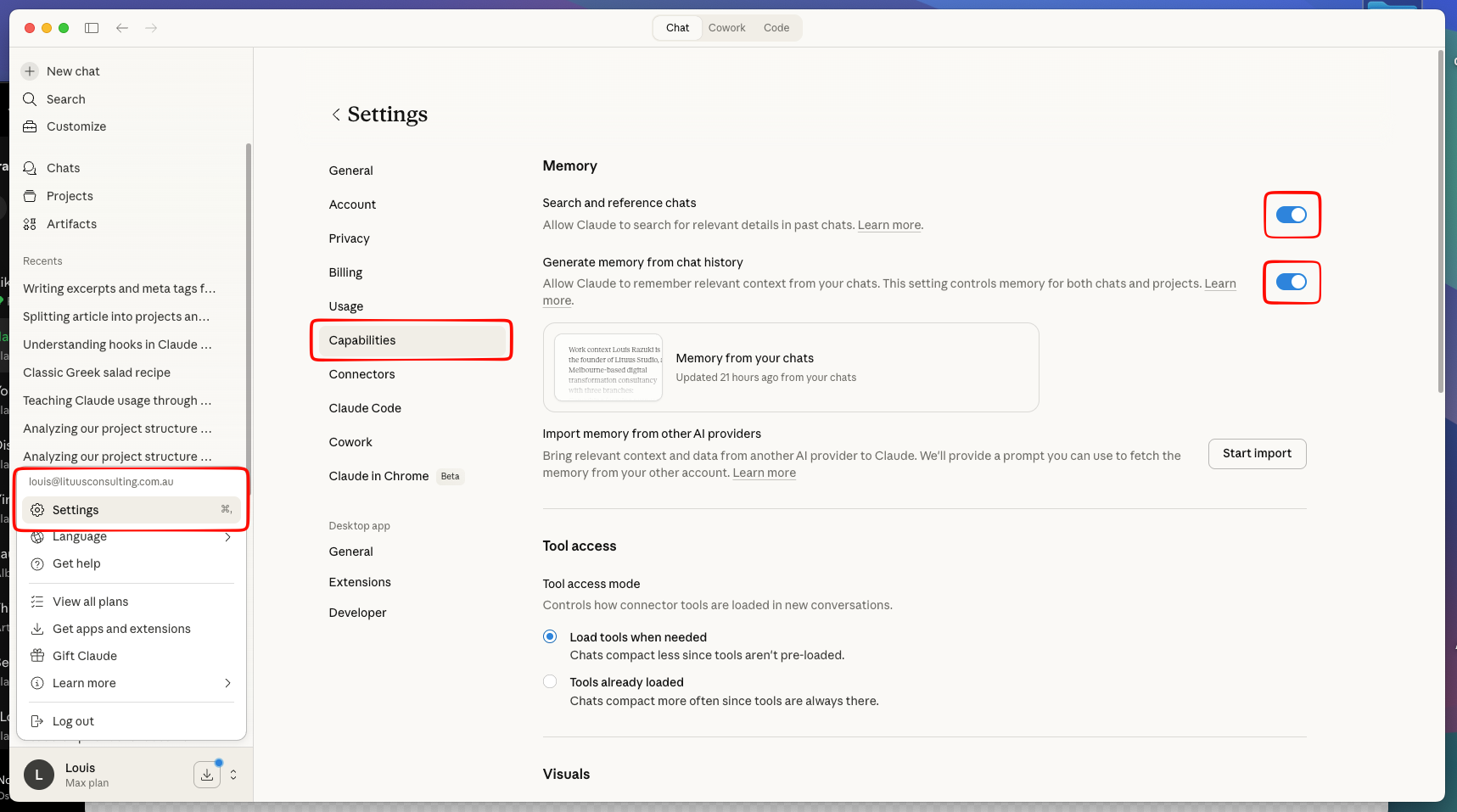
Several powerful features are either off by default or easy to miss. Go to Settings and look for the capabilities section.
Artifacts and analysis. Artifacts are standalone outputs — documents, code, interactive visualisations, even small applications — that Claude creates alongside the conversation rather than just dumping text into the chat window. Analysis lets Claude run Python code in a sandboxed environment. Together, these mean Claude can build you a working prototype, analyse a dataset, generate a chart, or create an interactive tool — not just talk about doing it. Turn both on.
Memory. Claude can remember things about you across conversations — your preferences, your work context, recurring projects. It builds over time and makes each new conversation less of a cold start. Turn it on.
MCP integrations. This is where Claude connects to your other tools — Google Drive, Gmail, Calendar, Notion, Slack, GitHub. Each integration gives Claude access to context it would otherwise need you to paste in manually. You don't need to set these up on day one. But when you find yourself constantly copying content from one tool into Claude, that's the signal to connect it.
Review Privacy. You can choose to turn off using your data for training purposes which helps address some of the privacy and confidentiality concerns a lot of us have when it comes to AI.
Projects
Projects are Claude's version of persistent context. You create one, give it a name, upload relevant files, write custom instructions, and every conversation within that project inherits that context automatically.
This is one of the most underused features. Most people start every conversation from scratch, pasting the same context repeatedly. A project means Claude already knows what you're working on. I'll go deeper on this in a later article in the series, but for now — if you've got a recurring type of work, create a project for it. You'll feel the difference immediately.
What's Next
Getting set up is the easy part. The real shift happens when you start understanding how to actually work with Claude — what a session is, how context works, why finishing a conversation properly matters as much as starting one, and why everything you learned about prompting from ChatGPT might be holding you back.
That's the next article.

Louis Razuki
Founder & Guide
I write about working with AI — the tools, the mindsets, the builds that actually deliver. Three years of daily AI practice distilled into experiments, insights, and honest takes on what's real and what's just hype.